Selling fast!
Get yours while you can.
Free Shipping on web orders over $50! (USA only. Some exclusions.) Our mid-season sale is on. Shop Phones
EVM-MT-03-02
Couldn't load pickup availability
Prices valid in USA, Canada, and PR only.
The EVOM™ Manual replaces all previously manufactured WPI manual TEER meters, including the EVOM3, EVOM2, and MilliCell® ERS-2, which have now been discontinued.
This next-generation manual TEER meter features automatic data logging for streamlined data collection. Its low-noise design ensures greater resolution and accuracy, while the automatic 20X sample averaging enhances measurement stability and precision. Select from adjustable fixed measurement currents (2, 4, or 10 μA) to suit your protocol. The auto-ranging resistance measurements span from 1 Ω to 100,000 Ω, with three fixed current range options for added flexibility.
Engineered for reliability, the low-current, low-voltage design prevents metal ion transport and delivers fast resistance stabilization for low-level readings under 200 Ω, with a resolution as fine as 0.1 Ω. The ergonomic tilt stand minimizes glare for comfortable use, while automatic plate indexing supports operation with or without control well subtraction for resistance and potential difference (PD) measurements. Enjoy continuous data logging via USB flash drive, which is compatible with PC, Mac, and Linux, ensuring seamless integration into your workflow.
NEW FEATURE: In addition to the existing capability of data storage on a USB flash drive, the new version of the EVOM™ Manual now provides an option for a more secured mode of data transfer using a Windows® companion application.

The EVOM™ Manual delivers improved workflow efficiency, more stable and repeatable measurements versus traditional Trans Epithelial Electrical Resistance (TEER) meters. Providing you with vital feedback during experiment measurements, the EVOM™ Manual’s large screen offers a range of informational views. The new graphical displays for trend analysis and measurement values helps scientists deliver simple, stepwise methodology during experimental measurements. The touch screen interface provides you with an intuitive, easy-to-use menu for configuration.
Eliminating the need to log data by hand, the EVOM™ Manual writes the resistance or voltage information to a USB drive in CSV format for easy transfer to spreadsheets and data analysis programs. When used with the footswitch it enables hands-free recording of measurements.
At the heart of the EVOM™ Manual is our latest processor and circuitry, providing users with quick, easy and reliable readings due to its fast stabilization, automatic twenty times sampling average and low noise design. The auto ranging resistance feature allows for fast resistance measurements, and an over-range display feature eliminates false readings. The EVOM™ Manual has adjustable current levels in three fixed ranges with two lower ranges for sensitive membranes and high resistance ranges up to 100 KΩ.
Confluence of a cellular monolayer is determined by an increase or a plateau in tissue resistance detected using the unique electronic circuit of the EVOM™ Manual and the new STX4 electrode. The EVOM™ Manual qualitatively measures cell monolayer health and quantitatively measures cell confluence. The EVOM™ Manual produces a low AC current that avoids electrode metal deposits and adverse effects on tissues which can otherwise be caused by higher DC currents. The EVOM™ Manual uses low current and voltages and is designed for non-destructive testing for epithelial monolayer confluence in cell cultures. In addition, resistance readings are unaffected by membrane capacitance or membrane voltage. The accuracy and repeatability of the EVOM™ Manual-STX4 system makes this instrument ideal for permeability, PD and other detailed membrane studies.
| Part # | Descriptions |
| EVM-EL-03-03-01 | STX4 EVOM™ Electrode with Removable Blades for TEER in 6 mm Inserts |
| STX2* | Replacement Electrode Set (Requires 99672 for use with the EVOM3 or EVOM™ Manual) |
| STX3* | Adjustable electrode set for shallow wells, 5-9 mm depth |
| 3993* | 2 mm Adapter for EVOM2 |
*(Requires 99672 for use with the EVOM3 or EVOM™ Manual)
NEW EndOhm chambers include the EVOM™ Manual cable 99916.
| Part # | Descriptions |
| EVM-EL-03-01-01 | ENDOHM-6 EVOM™ Electrode for TEER in 6 mm Insert |
| EVM-EL-03-01-02 | ENDOHM-12 EVOM™ Electrode for TEER in 12 mm Insert |
| EVM-EL-03-01-03 | ENDOHM-24 EVOM™ Electrode for TEER in 24 mm Insert |
TEER measurement techniques for in vitro barrier model systems
TEER, Trans Epithelial Electrical Resistance, monitures the electical resistance of a cellular layer is the inverse presentation of the electrical conductance through the cellular layer. A high TEER value of the cellular layer is indicative of an intact cellular monolayer and suggests low or restricted permeability of ions and molecules (i.e., low conductance). Similarly, a decrease in the TEER value suggests a compromised barrier function and indicates increased permeability. Tissue permeability studies require a confluent cellular layer, and TEER measurement is gennerally used to confirm the formation of a confluent monolayer.

Initially, 24 hours after cell seeding transwell, TEER values are generally low, because the current passes can pass easily between the cells. Over time, the cells multiply and start covering the gaps. Finally, a confluent cellular monolayer is formed. At that point the permeable membrane is fully covered with cells and does not allow easy passage of electrical current. This results in a high TEER value.
TEER is a normalized value of resistance per 1 square centimeter of unit area. To compute TEER, multiply the measured resistance by the surface area listed below.
For example, a 6.6 mm insert measures 1707 Ω, the TEER is 1707 Ω * 0.331 or 505 Ω.
• 6 well plate (24 mm inserts) 4.53 cm2
• 12 well plate (12 mm inserts) 1.13 cm2
• 24 well plate (6.5 mm inserts) 0.3316 cm2
• 96 well plate (4.3 mm inserts) 0.145 cm2
EVOM™ Manual Upgrade to EVM-MT-03-02
EVOM™ Manual Quick Start Guide
Download EVOM™ Manual Upgrade (Released Feb 2025)
Will the EVOM™ Manual work with Endohm’s?
Yes, but the 99672 adaptor is required or the new EVOM3/EVOM Manual cable 99916.
Why would I want to use the blank function?
The blank feature is used when you want to subtract out any measurement that is not from the membrane, such as the electrode and fluid resistances.
Does the EVOM™ Manual system automatically calculate TEER?
No, TEER measurement requires an area calculation. To compute TEER, multiply the measured resistance by the appropriate surface area (below). For example, a 12 mm insert measures 565 Ω, the TEER is 565 Ω × 1.13 cm2 = 638.5 Ω- cm2. Here are the surface areas generally applicable to different transwell/insert formats: 6 well plate (24 mm inserts) 4.52 cm2, 12 well plate (12 mm inserts) 1.13 cm2, 24 well plate (6.5 mm inserts) 0.33 cm2, 96 well plate (4.3 mm inserts) 0.14 cm2. For Automated TEER Measurements, consider using the WPI REMS Automated TEER Measurement System.
EVOM™ Manual data is stored automatically when the last well is reached. How do I store the data when I only want to measure 8 of 96 wells?
Clear any data in memory by opening settings, store menu then press new plate, that will clear any prior readings. Return to the main screen, open the preview screen, select each well to measure (the selection turns green), place the electrode, then measure. When you’re done measuring the selected wells, open the settings, press the store screen menu, then press store new to save the plate data to the USB drive.
How should you store the EVOM™ Manual and electrodes if they will be exposed to UV light in a laminar hood for extended periods of time?
Take the EVOM™ Manual out of the laminar hood after use. Next time, turn on the UV inside the hood. Once the hood is disinfected by UV, turn off UV, next spray 70-100% ethanol or isopropanol onto paper towel and wipe the EVOM™ Manual. Do not spray alcohol directly onto EVOM™ Manual.
Why am I getting dashes as reading on EVOM™ Manual, even if I have the STX4 electrode inside the sample?
The electrode in the air or partially immersed in the liquid can show dashes since it records unstable read outs. The electrode tip portion (sensing region) must stay fully immersed. You may also notice unstable read outs when the electrode tip is not fully immersed. Make sure to select apical and basolateral volumes so that electrode tip stays fully immersed. You need to use apical and basolateral volumes greater than what is suggested by the insert manufacturer. For example, for Corning-24 well Transwell (example Corning 3470) we recommend minimum 300 µL on the top (apical) and 850 µL on the bottom (basolateral). [These volumes are a little more than the least required for STX4 electrode.]
Here are the steps:

Figure 1: STX4 Adjustment of Electrode Height. Rotate the front ring clockwise so that the electrode can enter to the maximum depth inside the well.

Figure 2: STX4 Electrode tip and liquid volume requirements. Make sure the electrode sensing tip (red boxed portions) on both blades stay fully immersed in a conductive liquid, such cell culture media or buffer during measurement. You need to have adequate apical and basolateral volumes to get a stable reading. Since STX4 stays hung, the increased volume must be used to make sure electrode sensing region fully immersed.
NOTE: You must use more liquid volumes than recommended by the insert manufacturer. Insert manufacturer’s recommended volumes will not keep electrode tip fully immersed.
[As mentioned as an example previously, for Corning-24 well Transwell (e.g., Corning 3470) we recommend using minimum 300 µL on top (apical) and 850 µL on bottom (basolateral). These volumes are a little more than the least required for STX4 electrode. You can check visually to make sure the apical and basolateral volumes are adequate to keep the electrode tips fully immersed, and then consistently use those volumes.]
Can increasing or changing sample liquid volumes change my resistance values?
You can expect to see a change of raw resistance values. However, you subtract the blank values (blank Transwell with no cells) from the sample values (Transwell with cells). This way, you subtract the blank value with increased volume from samples with increased volume. Thus, any change of resistance contributed by increased volume is omitted. Consistently use the same volumes for all your samples in an experiment.
Is there an electrode cleaning or maintenance instruction that I can follow?
Below are the steps that can be followed for STX4 cleaning or maintenance. Make sure you use enough liquid levels during cleaning or maintenance at least up to the red boxed region
Rinse with sterile DI water/buffer.
Why do my readings appear to be drifting?
Drift refers to readings that continuously increase or decrease significantly (either voltage or resistance) over time. Example: At 1000 Ω, the reading is increasing 100 Ω/ minute. (A drift of 10 Ω/minute is acceptable.) Excessive drift may be caused by changes in the pH or temperature, or the electrode needs cleaning.
There are a few things that can be a possible cause of this drift.
Why are my electrode readings unstable?
If you experience instability at 500 Ω, the reading jumps from 450 to 550 Ω and does not settle down (an instability ±5 Ω is acceptable in the 500 Ω range). In the higher ranges, up to ±1000 Ω is acceptable at the 100K range. Electrodes showing instability may require enzymatic cleaning.
How do I check whether my EVOMTM Manual system is functioning properly?
Are there any other electrode handing instruction that WPI recommends?
![]() |
Do NOT hold the electrode by the cable. It can physically break the internal connections gradually. |
![]() |
Hold the electrode by the arrowed region (plastic). |
![]() |
Limit liquid immersion or liquid spray level somewhere up to here (maximum). You do not want the liquid to get inside and reach up to internal the cables or connectors that’s why. You can wipe with the rest of the electrode with a paper towel sprayed with isopropanol or ethanol (do not spray directly). |
This unit conforms to the following specifications:
| Type | Descriptions |
| Tissue Sampling Frequency | 12.5 Hz |
| Sample Averaging | 20 samples per second |
| Resistance Ranges |
|
| Auto Mode | 1 to 100,000 Ω auto current 2 μA, 4 μA, 10 μA |
| Resistance Resolution | 0.1 Ω (under 200 Ω); 1 Ω (over 200 Ω) |
| Resistance Accuracy |
|
| Voltage Resolution | 0.001 V, 0.1 mV |
| Accuracy Resistance | 0.1 Ω (200 Ω); 1 Ω (above 200 Ω) |
| Accuracy voltage | ± 0.1 mV |
| Current Levels |
|
| Display Update Rate | 0.5 seconds |
| Battery | 3.7V Li-ion 2500 mAh** |
| Charging Period | 5.5 hours (power off); 6 hours (run time) |
| Charge Current | 200 mA |
| Power Consumption | ~250 mA |
| Certifications | CE |
** mAH means milliamp hours.
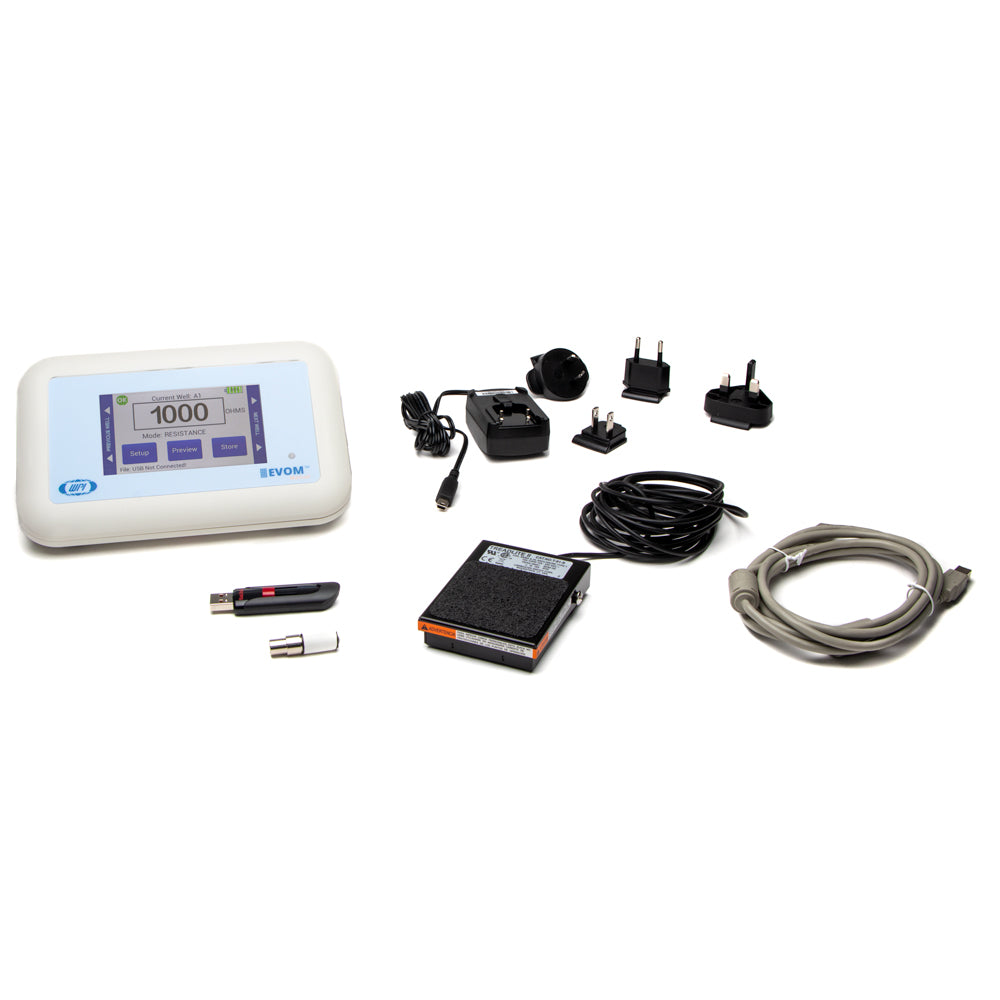
| What is included with the EVOM™ Manual | QTY |
| evm-mt-03-01 : EVOM™ Manual Epithelial Volt Ohm Meter | 1 |
| 300749 : USB drive 32 GB (Used for storage. Also contains a Python 3.8 program for continuous digital monitoring of a target insert). | 1 |
| 503535 : USB cable | 1 |
| 99673 : Calibration kit, 1000Ω Test Resistor | 1 |
| 803025 : A/C power cord and charger | 1 |
| 13142 : Foot switch | 1 |
NOTE: A 99672 EVOM2 to EVOM Manual Electrode Adapter is sold separately. The STX2, STX3 and all STX100s require the use of this adapter with the EVOM3 or EVOM Manual.

$4,500.00
Selling fast!
Get yours while you can.